For freelancers & founders
Your own workspace for the work you do alone.
Every account gets a personal workspace that never has other members. It starts free with up to three projects; with Personal it becomes unlimited.
Concrete workflows
What the day looks like.
-
Get a grip on your day
From “everything in my head” to a list you can work through.
- Step: Capture tasks the moment they appear: with quick capture in the desktop app or on the web.
- Step: Assign them to projects and set priority and due date.
- Step: My Tasks groups by due date or project; the week board reschedules by drag and drop.
- Step: Open focus for the one task that matters right now.
-
Structure an idea
One sentence becomes a plan with tasks.
- Step: Start a Flow from a sentence, a template or a blank page.
- Step: Develop the idea step by step instead of creating tasks right away.
- Step: Carry the result over into a project.
- Step: On a canvas you collect notes and links freely, like a whiteboard.
-
Found a company
Founding tasks in a dedicated project instead of scattered notes.
- Step: Create a project with the “Company / Startup” template.
- Step: Pick founding tracks, stage and target customer; the template brings matching tasks.
- Step: Follow readiness for legal, finance, compliance and launch inside the project.
- Step: Link regular projects to the company project as independent workstreams.
-
Keep knowledge and files
Processes, offers and documents in one place.
- Step: Write wiki pages with a page tree, favorites, search and templates.
- Step: Upload files to projects, tasks or comments.
- Step: Find everything in the documents view with filters and trash.
-
Use AI with your own key
You decide what the AI works with.
- Step: Store your own OpenAI key in the plan settings.
- Step: Use the AI assistant (✦) for summaries and suggestions; changes arrive as an action card that you confirm.
- Step: Or connect Claude, ChatGPT, Codex, Cursor and others through the MCP server with your permissions.
What you use
The features involved.
Personal workspace
Just for you, separate from team billing and team workspaces.
Tasks, Today & focus
Inbox, week board, focus and reminders.
Flows
Automate routine work; 2,000 runs a month with Personal.
Company project template
“Company / Startup” for founding, validation, finance and launch.
Calendar feed
Your tasks as a feed in the calendar of your choice.
Wiki, files, canvas
Knowledge, documents and free whiteboard surfaces.
AI & MCP
Own OpenAI key; connect AI clients via MCP and the REST API.
Web & desktop app
Browser plus macOS and Windows; the iPhone app follows.
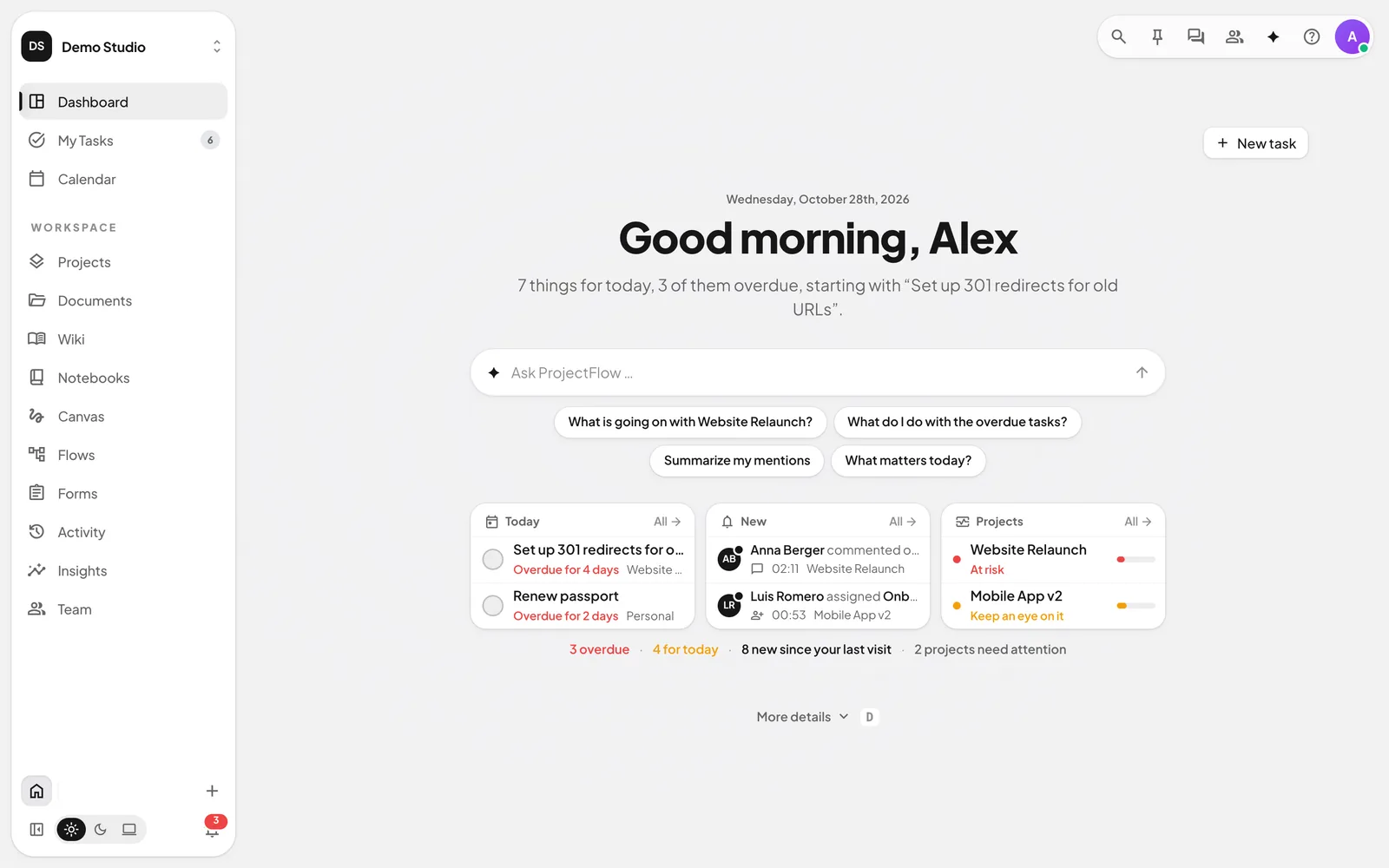
In the app
The dashboard: today, new and your projects.
Pricing
Start free, remove the project limit with Personal.
Free is enough to try it out. Personal removes the project limit and gives you more storage.
-
Free
To try it out and get started.
0 €
forever
Join the waitlist- 1 person, up to 3 projects
- 1 GB file storage
- Files up to 50 MB
-
Personal
Your personal workspace with no project limit.
4 €
per month, billed yearly
Join the waitlist- Unlimited projects, 2,000 flow runs a month
- 25 GB file storage
- Just for you, separate from team billing
All prices are final. No VAT is charged under the German small business scheme (§ 19 UStG). See all plans
Security & data
Where your data lives and who can see it.
Data in the EU
Database and functions run in European data centres. AI requests are processed in the USA.
Passkeys & two-factor
Sign in with a passkey, Google, Apple or GitHub. You can also require an authenticator app.
Roles & externals
Owner, admin, member. Externals only see the project you invite them to.
AI access with a log
AI clients work with your role and the permissions you choose. You can revoke access at any time, and every access is logged.
Questions & answers
Frequently asked questions
Who is ProjectFlow for?
For product, engineering, design and marketing teams. And for founders and freelancers who want to organise their work in one place.
How much does ProjectFlow cost?
Until paid plans launch, ProjectFlow is free. After that there is a free plan, Personal for your personal workspace (€4 a month billed yearly) and the Team plan at €10 per seat and month billed yearly (€12 monthly). AI works with your own OpenAI key, and an AI add-on will be available directly in the app later; externals in projects cost nothing extra.
How much storage do I get?
Free has 1 GB, Personal 25 GB (files up to 50 MB). Team has 10 GB per seat, pooled and at least 25 GB, Organization 50 GB per seat (files up to 250 MB).
What happens to my data if I don’t upgrade?
Nothing gets lost. You keep access to all projects and can upgrade later at any time.
Which devices does ProjectFlow run on?
In the browser, as a desktop app for macOS and Windows, and soon as an iPhone app on the App Store. All of them work with the same data.
How do I work with clients or externals?
Invite externals to individual projects. They only see that project and do not become members of your workspace.
Where is my data stored?
Database and functions run in European data centres. AI requests are processed in the USA. All details are in the privacy policy.
Can I connect Claude, ChatGPT or Cursor?
Yes, through our MCP server. You sign in with ProjectFlow, choose workspace and permissions, and can disconnect at any time. Guide: MCP docs.
More use cases
Agencies & client projects
Bring clients in without opening your workspace.
Teams
One shared place for planning, delivery and conversations.
Security & data
Where your data lives and who can see it.
Try it with a real project.
Start for free and bring your team and clients in when it suits you.
- Free to start
- Web, desktop app and iPhone app (soon)
- German and English