For agencies & client projects
Bring clients in without opening your workspace.
Every client project keeps scope, milestones and tasks in one place. Clients join as external guests and see only the one project you invite them to.
Concrete workflows
What the day looks like.
-
Set up a client project
From template to first board in a few minutes.
- Step: Create a project with the “Client Delivery” template: scope, milestones, handoffs and delivery control are prepared.
- Step: Enter the project goal, success criteria and decision owner so everyone sees the same frame.
- Step: Add milestones for sign-offs and attach tasks to them.
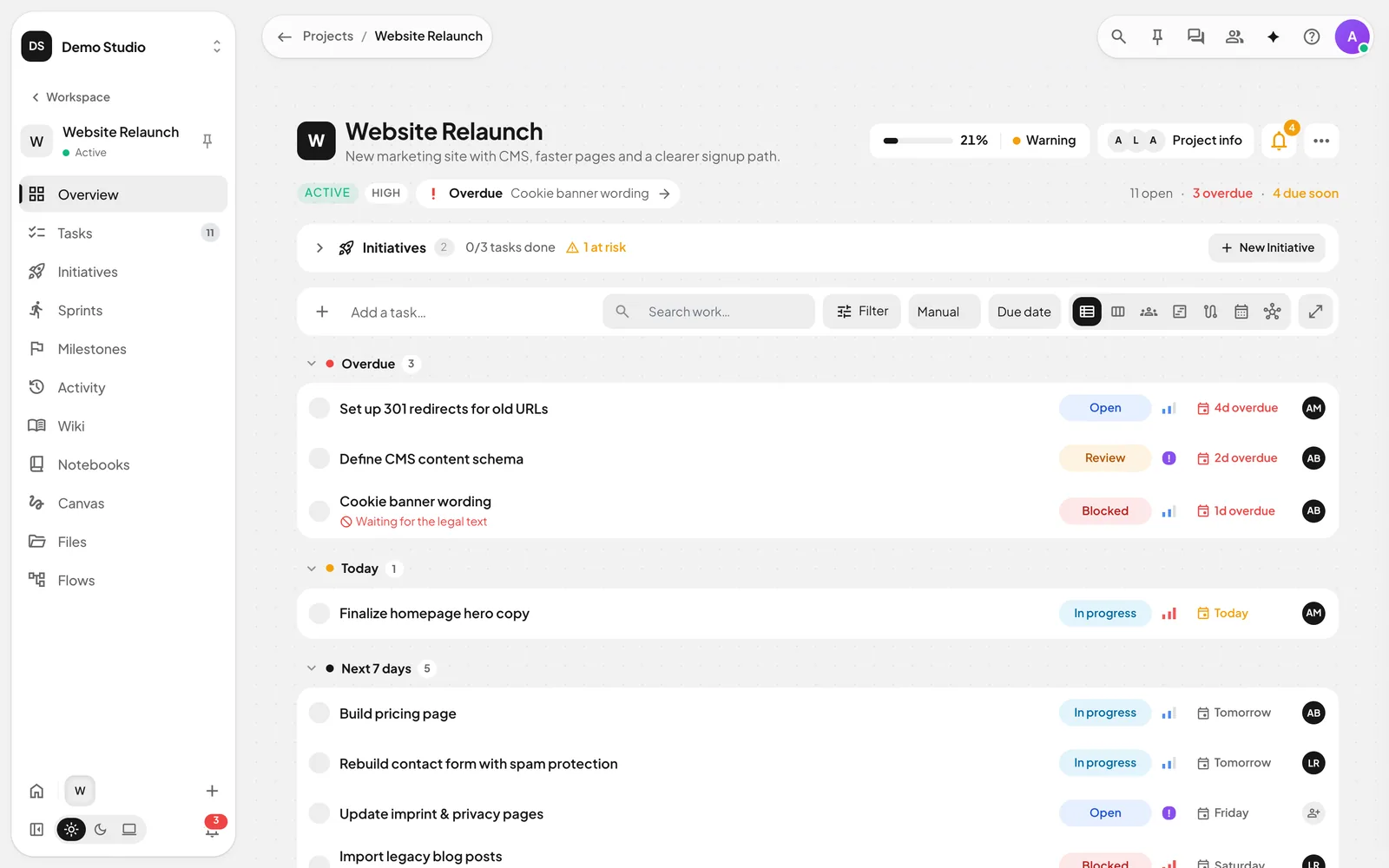
- Step: Work through tasks on the board with status, priority and owner; the list view shows the same tasks grouped by due date, status or person.
-
Invite the client as a guest
The client sees their project, not your workspace.
- Step: Invite the client by email as a guest to exactly one project.
- Step: Guests do not become workspace members and see neither other projects nor areas such as Insights.
- Step: Give the guest a role with the permissions they need; roles are freely definable in the workspace.
- Step: Discuss tasks right in the task comments instead of long email chains.
-
Collect requests with a form
New requests arrive as tasks in the right project.
- Step: Build a form with the questions you need for a request.
- Step: Share it as a link, QR code or embed it on your website.
- Step: Map the answers to the fields of a new task in your project.
- Step: Every submission shows up in the form’s inbox and can be exported as CSV.
-
Keep the overview
What is due today, what is new, where does it stall?
- Step: The dashboard shows what is on today, what changed and how your projects are doing.
- Step: In the activity feed you filter by person, project, type and period.
- Step: Insights show throughput, cycle time, workload and project health of the workspace.
- Step: Subscribe to due tasks as a calendar feed in your own calendar.
-
Switch from Trello, Asana or Jira
Bring existing projects along instead of starting over.
- Step: Start the import and choose the source: CSV, Trello, Asana, Jira or ClickUp.
- Step: Map columns, status, priority and people.
- Step: Check the preview and pick a new or existing project as target.
- Step: The import report shows what was brought over; you can undo the import for seven days.
What you use
The features involved.
Projects with templates
“Client Delivery” template, goal, success criteria and cadence per project.
Tasks as board and list
Status, priority, owners, subtasks and comments.
Milestones & initiatives
Sign-offs and bigger efforts bundle tasks with progress.
External guests
Invited per project, without access to the rest of the workspace.
Roles & permissions
Owner, admin, member, guest and custom roles with fine-grained permissions.
Forms
Public link, QR code or embed; answers become tasks.
Files & wiki
Files on projects, tasks and comments; wiki pages per project.
Import
CSV, Trello, Asana, Jira and ClickUp with preview and undo.
In the app
The overview of a client project.
Pricing
Guests cost nothing extra.
External guests in projects are included in the Team plan at no extra charge. You only pay for the seats of your own team.
-
Team
For teams of up to 50 members.
10 €
per seat / month, billed yearly
Join the waitlist- Up to 50 members, unlimited projects
- 10 GB storage per seat, pooled
- Externals per project for free
- Initiatives, sprints & modules
- Personal tokens & AI activity log
- Free 14-day trial
All prices are final. No VAT is charged under the German small business scheme (§ 19 UStG). You start Team with a free trial. See all plans
Security & data
Where your data lives and who can see it.
Data in the EU
Database and functions run in European data centres. AI requests are processed in the USA.
Passkeys & two-factor
Sign in with a passkey, Google, Apple or GitHub. You can also require an authenticator app.
Roles & externals
Owner, admin, member. Externals only see the project you invite them to.
AI access with a log
AI clients work with your role and the permissions you choose. You can revoke access at any time, and every access is logged.
Questions & answers
Frequently asked questions
Who is ProjectFlow for?
For product, engineering, design and marketing teams. And for founders and freelancers who want to organise their work in one place.
How much does ProjectFlow cost?
Until paid plans launch, ProjectFlow is free. After that there is a free plan, Personal for your personal workspace (€4 a month billed yearly) and the Team plan at €10 per seat and month billed yearly (€12 monthly). AI works with your own OpenAI key, and an AI add-on will be available directly in the app later; externals in projects cost nothing extra.
How much storage do I get?
Free has 1 GB, Personal 25 GB (files up to 50 MB). Team has 10 GB per seat, pooled and at least 25 GB, Organization 50 GB per seat (files up to 250 MB).
What happens to my data if I don’t upgrade?
Nothing gets lost. You keep access to all projects and can upgrade later at any time.
Which devices does ProjectFlow run on?
In the browser, as a desktop app for macOS and Windows, and soon as an iPhone app on the App Store. All of them work with the same data.
How do I work with clients or externals?
Invite externals to individual projects. They only see that project and do not become members of your workspace.
Where is my data stored?
Database and functions run in European data centres. AI requests are processed in the USA. All details are in the privacy policy.
Can I connect Claude, ChatGPT or Cursor?
Yes, through our MCP server. You sign in with ProjectFlow, choose workspace and permissions, and can disconnect at any time. Guide: MCP docs.
More use cases
Freelancers & founders
A personal workspace for your own projects.
Teams
One shared place for planning, delivery and conversations.
Security & data
Where your data lives and who can see it.
Try it with a real project.
Start for free and bring your team and clients in when it suits you.
- Free to start
- Web, desktop app and iPhone app (soon)
- German and English